Check the App Status
In the App status section, you can check the connection status of the DispoPilot.apps with virtual vehicles.
|
You can check the app status both in the Logistics Management and in the Messaging service.
|
To open the App status section, click the App status button in the service selection in the Logistics Management section.
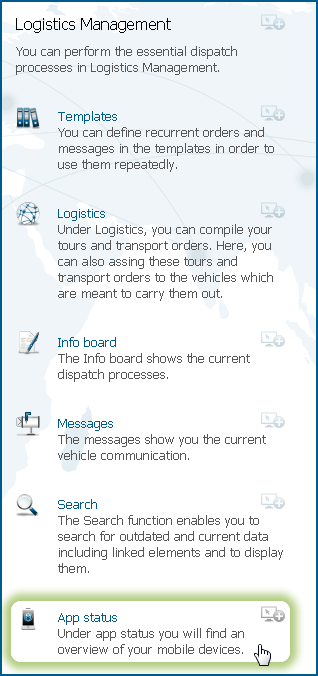
The App status section is now displayed in the service section.
|
1.
|
Click the App status button in the Logistics Management service.
|
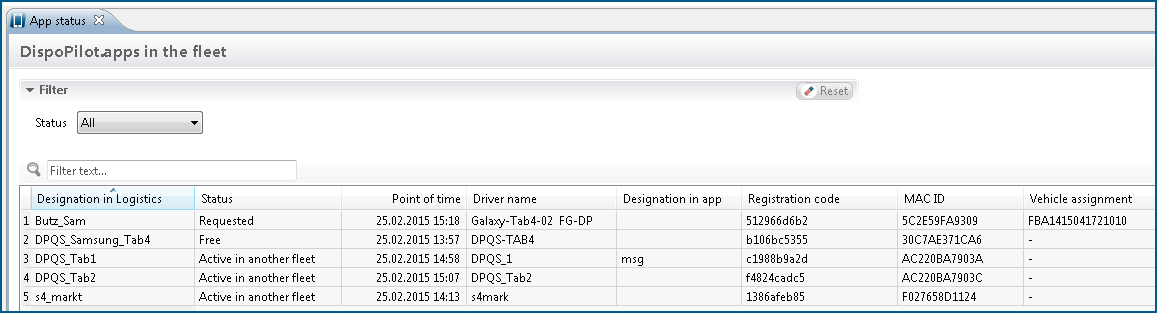
The App status tab is opened.
|
2.
|
|
3.
|
Select the status from the options All, Free, Connected, Requested, or Rejected and Active in another fleet.
|
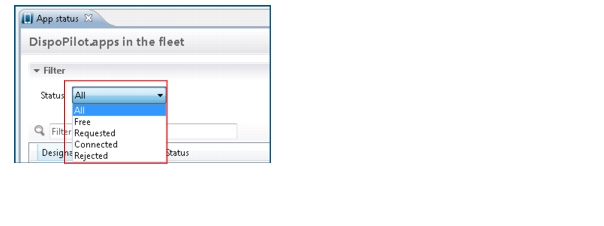
The following data table explains the various status specifications:
|
The status Free means that the app is not assigned to any virtual vehicle. A connection request can be made.
|
|
|
The status Connected shows that the app has already been connected with a virtual vehicle.
|
|
|
The status Requested shows that the connection request to the DispoPilot.app has been sent to the driver, but has not been confirmed yet.
|
|
|
The status Rejected shows that the connection request of the DispoPilot.app with the virtual vehicle has been rejected by the driver and has not been assigned to any virtual vehicle. A connection request can be made.
|
|
|
Under the status All, all apps are displayed.
|
|
The states Free and Rejected are technically identical. In the case of both states you can send a connection request to the app of the driver.
|
|
If a driver confirms or disconnects the connection over the app, a message will be generated. This message is displayed in the News centre, in the Inbox widget, and in the Messages view.
|
